


Everything you need to know, all in one place.
This guide will help you log in to Bizi, learn how to navigate the platform, and explain how you earn BiziBucks.

Logging in takes less than a minute, and once you’re in, everything you need is right at your fingertips.
How to log in
*Note: Parents do not have individual Bizi accounts. Please log in through your child's account using the steps above.
Trouble logging in? First, reach out to your school to ensure your username and password are correct. Then, contact Bizi support by emailing support@bizimotivates.com.
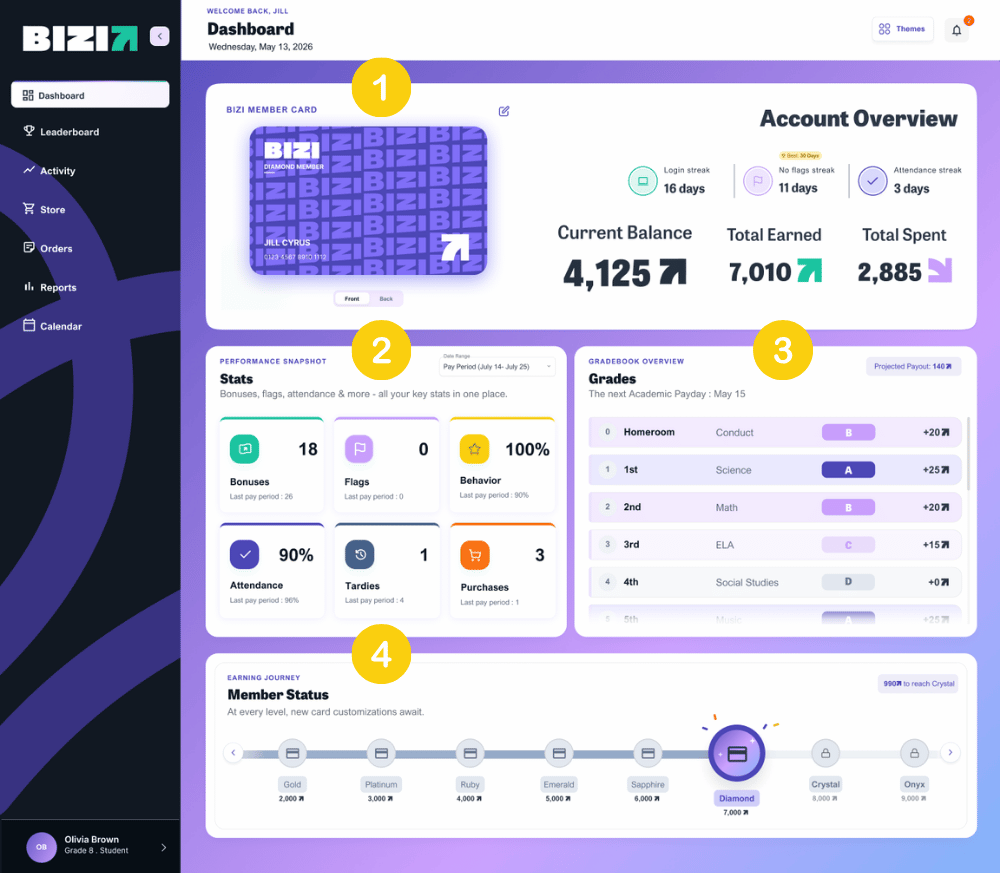
The Student Dashboard:
Your dashboard is your home base and landing page. It includes:
Navigate Bizi through the side rail
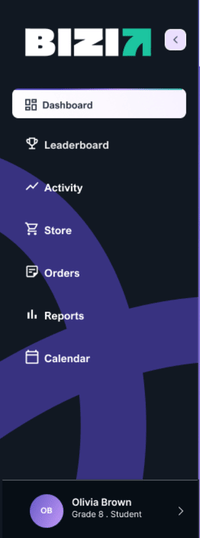
Leaderboard: Here's where you check to see who is leading the way. Change the earning type and see which grade, class or house is earning the top spot.
My Activity: Think of My Activity like your transaction history. Every BiziBuck earned or spent is logged here. Filter by any date range to review Daily Behavior, Daily Attendance, Bonuses received, Academic Pay Day earnings, and Purchases.
Store: This is where BiziBucks become real rewards. Browse items in the School or More Stores tab, add them to your cart, and complete the purchase when you are ready.
My Orders: Review all orders you’ve placed, including their current status: pending, packaged, redeemed, refunded, or canceled.
My Reports: View pay period statements from any date range, plus review a detailed breakdown of your bonuses and flags.
Calendar: Stay on top of important dates. Order cutoffs, store days, and academic pay days are all here.
Account Menu (your initials): Access the “How to Earn” guide, Contact Us, Terms and Policies, or log out.
There are four ways to earn:
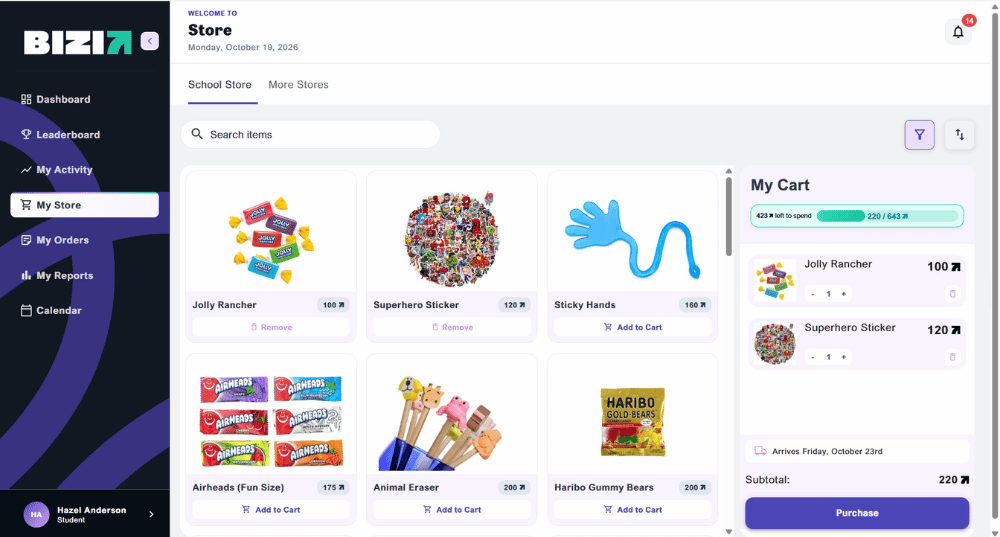
*Note: On Store Day, your school may use a pick up or delivery system to redeem rewards. Check with your teacher or school staff if you are unsure how your school handles distribution.
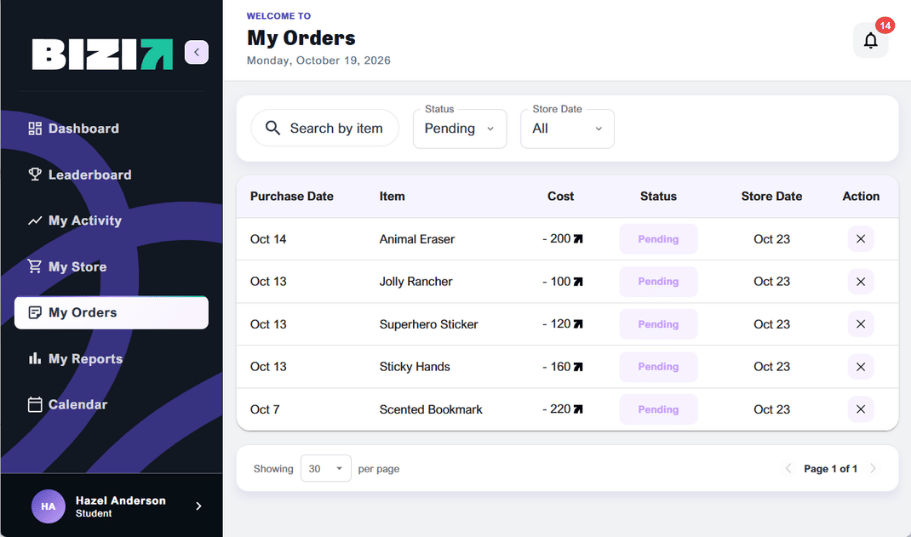
Once you've placed an order, you can track it and make changes right from My Orders.
*Note: Once it is past the store cutoff date, your order can no longer be canceled.
Check My Activity to see which deposit you did not receive. There are a few reasons you may miss a deposit. For attendance, make sure you were marked present that day. For behavior, a flag from any staff member will block your behavior deposit for that period or day. For academics, deposits process every two weeks on your school's Pay Day, not daily. If everything looks correct and you still have not received a deposit, reach out to your teacher or administrator first, then contact us by going to your Account Menu, clicking Contact Us, and sending us a message.
Parents do not have a separate login. Head to app.bizimotivates.com/login and log in using your child's school credentials via Clever or ClassLink. From there, you can see their balance, activity history, and order status. If you do not have your child's credentials, reach out to their school.
Parent can also sign up to receive biweekly updates on their child’s progress in Bizi by filling out this form: app.bizimotivates.com/parent- signup.
A flag is issued by a staff member for a behavior that needs to be corrected. It is not a referral, but it does have a consequence: one flag blocks your behavior deposit for that day (elementary) or that class period (middle and high school). Flags are visible in My Reports.
Yes, flags can be removed, but that conversation needs to happen with your teacher or administrator. They have the ability to remove a flag if they determine it was issued in error. Bizi cannot remove flags on a teacher's behalf. If you feel a flag was unfair, bring it up with the staff member who issued it or your school administrator.
Head to My Activity. Every BiziBuck earned or spent is logged there. You can filter by date range and see a breakdown of attendance, behavior, academics, bonuses, and purchases. For a full pay period summary, check My Reports.
Grades sync nightly from your school's SIS. If a grade was just entered or updated today, it will reflect in Bizi the following day. If grades have been missing for more than a day or two, reach out to our support by going to your Account Menu, clicking Contact Us, and sending us a message.
Yes, as long as the store cutoff date has not passed. Go to My Orders, find the order, and click the red X in the Action column. Once the cutoff has passed, orders can no longer be canceled.
Orders are fulfilled on your school's Store Day. You can find the next Store Day in the Bizi Calendar and keep tabs on your order’s status on the My Orders page. Check with your teacher or staff if you are unsure whether your school uses a pickup or delivery system on Store Day.
First, check the status of your order in My Orders. If the next Store Day has not yet passed, your order is still on its way. Remember, orders are fulfilled on Store Day, not immediately after purchase. If Store Day has passed and you did not receive your item or are missing something, contact your Store Manager for assistance. Not sure who your Store Manager is, or still need help? Go to your Account Menu, click Contact Us, and send us a message.
Member Status tracks your cumulative BiziBuck earnings throughout the year. As your earnings grows, you move through status tiers — each one unlocking new features to customize your Bizi Card. Check your current status on the Dashboard.
Bizi balances reset to zero at the start of each new school year. Every student, new or returning, starts from the same place. Think of it like a fresh season: last year's earnings are done, and the new year is yours to build.
If your new school uses Bizi, your account and Bizi balance follow you. If your new school does not use Bizi, you will no longer have access to your account.
No. Bizi does not send BiziBucks to students directly. Every BiziBuck has to be earned through attendance, behavior, academics, and bonuses. That is what makes them meaningful. Show up, stay on track, and your balance will grow on its own.
You're all set! Log in, check your BiziBuck balance, and start earning. If you ever have questions, use the Account Menu to reach us or visit the "How to Earn" guide anytime.
This guide will help you log in to Bizi, learn how to navigate the platform, and explain how you earn BiziBucks.
Logging in takes less than a minute, and once you’re in, everything you need is right at your fingertips.
How to log in
*Note: Parents do not have individual Bizi accounts. Please log in through your child's account using the steps above.
Trouble logging in? First, reach out to your school to ensure your username and password are correct. Then, contact Bizi support by emailing support@bizimotivates.com.
The Student Dashboard:
Your dashboard is your home base and landing page. It includes:
Navigate Bizi through the side rail
Leaderboard: Here's where you check to see who is leading the way. Change the earning type and see which grade, class or house is earning the top spot.
My Activity: Think of My Activity like your transaction history. Every BiziBuck earned or spent is logged here. Filter by any date range to review Daily Behavior, Daily Attendance, Bonuses received, Academic Pay Day earnings, and Purchases.
Store: This is where BiziBucks become real rewards. Browse items in the School or More Stores tab, add them to your cart, and complete the purchase when you are ready.
My Orders: Review all orders you’ve placed, including their current status: pending, packaged, redeemed, refunded, or canceled.
My Reports: View pay period statements from any date range, plus review a detailed breakdown of your bonuses and flags.
Calendar: Stay on top of important dates. Order cutoffs, store days, and academic pay days are all here.
Account Menu (your initials): Access the “How to Earn” guide, Contact Us, Terms and Policies, or log out.
There are four ways to earn:
*Note: On Store Day, your school may use a pick up or delivery system to redeem rewards. Check with your teacher or school staff if you are unsure how your school handles distribution.
Once you've placed an order, you can track it and make changes right from My Orders.
*Note: Once it is past the store cutoff date, your order can no longer be canceled.
Check My Activity to see which deposit you did not receive. There are a few reasons you may miss a deposit. For attendance, make sure you were marked present that day. For behavior, a flag from any staff member will block your behavior deposit for that period or day. For academics, deposits process every two weeks on your school's Pay Day, not daily. If everything looks correct and you still have not received a deposit, reach out to your teacher or administrator first, then contact us by going to your Account Menu, clicking Contact Us, and sending us a message.
Parents do not have a separate login. Head to app.bizimotivates.com/login and log in using your child's school credentials via Clever or ClassLink. From there, you can see their balance, activity history, and order status. If you do not have your child's credentials, reach out to their school.
Parent can also sign up to receive biweekly updates on their child’s progress in Bizi by filling out this form: app.bizimotivates.com/parent- signup.
A flag is issued by a staff member for a behavior that needs to be corrected. It is not a referral, but it does have a consequence: one flag blocks your behavior deposit for that day (elementary) or that class period (middle and high school). Flags are visible in My Reports.
Yes, flags can be removed, but that conversation needs to happen with your teacher or administrator. They have the ability to remove a flag if they determine it was issued in error. Bizi cannot remove flags on a teacher's behalf. If you feel a flag was unfair, bring it up with the staff member who issued it or your school administrator.
Head to My Activity. Every BiziBuck earned or spent is logged there. You can filter by date range and see a breakdown of attendance, behavior, academics, bonuses, and purchases. For a full pay period summary, check My Reports.
Grades sync nightly from your school's SIS. If a grade was just entered or updated today, it will reflect in Bizi the following day. If grades have been missing for more than a day or two, reach out to our support by going to your Account Menu, clicking Contact Us, and sending us a message.
Yes, as long as the store cutoff date has not passed. Go to My Orders, find the order, and click the red X in the Action column. Once the cutoff has passed, orders can no longer be canceled.
Orders are fulfilled on your school's Store Day. You can find the next Store Day in the Bizi Calendar and keep tabs on your order’s status on the My Orders page. Check with your teacher or staff if you are unsure whether your school uses a pickup or delivery system on Store Day.
First, check the status of your order in My Orders. If the next Store Day has not yet passed, your order is still on its way. Remember, orders are fulfilled on Store Day, not immediately after purchase. If Store Day has passed and you did not receive your item or are missing something, contact your Store Manager for assistance. Not sure who your Store Manager is, or still need help? Go to your Account Menu, click Contact Us, and send us a message.
Member Status tracks your cumulative BiziBuck earnings throughout the year. As your earnings grows, you move through status tiers — each one unlocking new features to customize your Bizi Card. Check your current status on the Dashboard.
Bizi balances reset to zero at the start of each new school year. Every student, new or returning, starts from the same place. Think of it like a fresh season: last year's earnings are done, and the new year is yours to build.
If your new school uses Bizi, your account and Bizi balance follow you. If your new school does not use Bizi, you will no longer have access to your account.
No. Bizi does not send BiziBucks to students directly. Every BiziBuck has to be earned through attendance, behavior, academics, and bonuses. That is what makes them meaningful. Show up, stay on track, and your balance will grow on its own.
You're all set! Log in, check your BiziBuck balance, and start earning. If you ever have questions, use the Account Menu to reach us or visit the "How to Earn" guide anytime.






See Bizi in action.
Made for schools who
show up for students.
Download Bizi
for Educators


![[headshot] image of customer for a consulting firm](https://cdn.prod.website-files.com/6a4e78ccec3ae84519ed2bce/6a4e78ccec3ae84519ed2d1e_Container.png)
![[headshot] image of customer for a consulting firm](https://cdn.prod.website-files.com/6a4e78ccec3ae84519ed2bce/6a4e78ccec3ae84519ed2d1f_resource%20Container%202.png)
![[headshot] image of customer for a consulting firm](https://cdn.prod.website-files.com/6a4e78ccec3ae84519ed2bce/6a4e78ccec3ae84519ed2d20_resources%20container%203.png)
![[headshot] image of customer for a consulting firm](https://cdn.prod.website-files.com/6a4e78ccec3ae84519ed2bce/6a4e78ccec3ae84519ed2d21_resources%20container%204.png)
![[headshot] image of customer for a consulting firm](https://cdn.prod.website-files.com/6a4e78ccec3ae84519ed2bce/6a4e78ccec3ae84519ed2d22_resources%20container%205.png)